Open the OC4 sample
- Click File › Samples and choose OC4 DeepCwind semi-submersible.
The hull's BEM data are bundled as builtin:deepcwind.h5. The NREL 5 MW tower and a lumped 350 t rotor-nacelle mass stand on it, and three catenary chains hold it in 200 m of water.
| Item | In the sample |
|---|---|
| Water depth | 200 m |
| Design code | ISO 19902 |
| Moorings | Three chains, 835.5 m long, fairleads 14 m below MSL |
| Sea state | Operational sea: JONSWAP, Hs 6 m, Tp 10 s, γ 2 |
| Rotor | NREL 5 MW, OpenFAST AeroDyn two-way, baseline controller |
| Hub wind | 11.4 m/s (rated), turbulence intensity 0.12 |
| Studies | Dynamic (120 s, 0.05 s steps, 20 s ramp); Nonlinear |
Look at the rotor
A rotor sits on the tower-top node. To add one to your own model, select that node and click Offshore › Renewables › Rotor (thrust curve or AeroDyn). The dialog offers three rotor models:
| Rotor model | What it does |
|---|---|
| Thrust curve (aerodynamic damping) | Quasi-steady thrust on the wind relative to the hub, so the rotor damps the platform motion. Also used in RAO studies. |
| OpenFAST AeroDyn, two-way (NREL 5 MW) | AeroDyn computes the blade loads from the moving rotor every step. The controller drives rotor speed and pitch. |
| Thrust load history (one-way) | A thrust history from the curve and a steady or Kaimal-turbulent wind, applied as a load at the node. It does not react to the tower motion. |
For AeroDyn the controller is Baseline (NREL 5 MW), ROSCO 2.10 (NREL 5 MW tuning) or None: fixed 12.1 rpm, 0° pitch.
Find the mooring pretension
The Nonlinear study holds the hull in place and gives the static pretension of the chains.
- In Explorer › Studies, select the Nonlinear study and press F5.
- Click Member forces to see the chain tensions.
Run in wind and waves
The Dynamic study runs 120 s of the JONSWAP sea with the rotor in a turbulent wind at rated speed. The rigid hull's potential-flow hydrodynamics are coupled to the flexible tower and the chains, which touch the seabed.
- Select the Dynamic study in Explorer › Studies and press F5.
- Wait for the progress card. Esc cancels.
The study's Properties have an Offshore group: sea state, ramp time, start from still-water equilibrium, time integrator, mooring line solver (FE cables (ANCF) or MoorDyn (lumped mass)), a line failure, and the radiation memory model.
Read the motions and the rotor
- Open the Chart and choose Offshore: body surge, heave and pitch, fairlead tensions, hydrodynamic base shear and wave elevation.
- Choose Rotor: NREL 5 MW: thrust, aerodynamic power, rotor speed and pitch, and hub wind. The note under the chart gives the means over the second half of the run.
- Animate plays the sea, the hull, the tower and the chains together.
Check the moorings
- With the Dynamic results shown, click Offshore design › Mooring check and choose:
| Field | Options |
|---|---|
| Code | API RP 2SK or DNV-OS-E301 |
| Condition | From the study, intact, damaged or transient |
| DNV consequence class | 1 or 2 |
| Anchor holding capacity | kN for every line; 0 skips the anchor check |
For the damaged condition, list the removed lines in the study's Broken lines (damaged) property and run it again.
Run the model in OpenFAST
FEA Offshore can write the NREL 5 MW on the model's tower and floating body as an OpenFAST v5 model and run it: ElastoDyn (platform, tower modes from the members), ServoDyn, AeroDyn, InflowWind, SeaState, HydroDyn (potential flow from the body's .h5 file, hull drag members) and MoorDyn (the mooring lines).
- Click Unlock model if the model is locked.
- Click Offshore › Renewables › Run the floating body in OpenFAST (NREL 5 MW).
- Enter the values below and click Run.
| Field | Default |
|---|---|
| Simulated time | 600 s |
| Time step | 0.0125 s |
| Sea state | The first sea state, or Still water |
| Controller | Baseline, floating gains (OC3 Hywind); Baseline (onshore gains); ROSCO 2.10 |
| Kaimal turbulence on the hub wind | Off |
| VTK meshes for animation | 0 frames per second (none) |
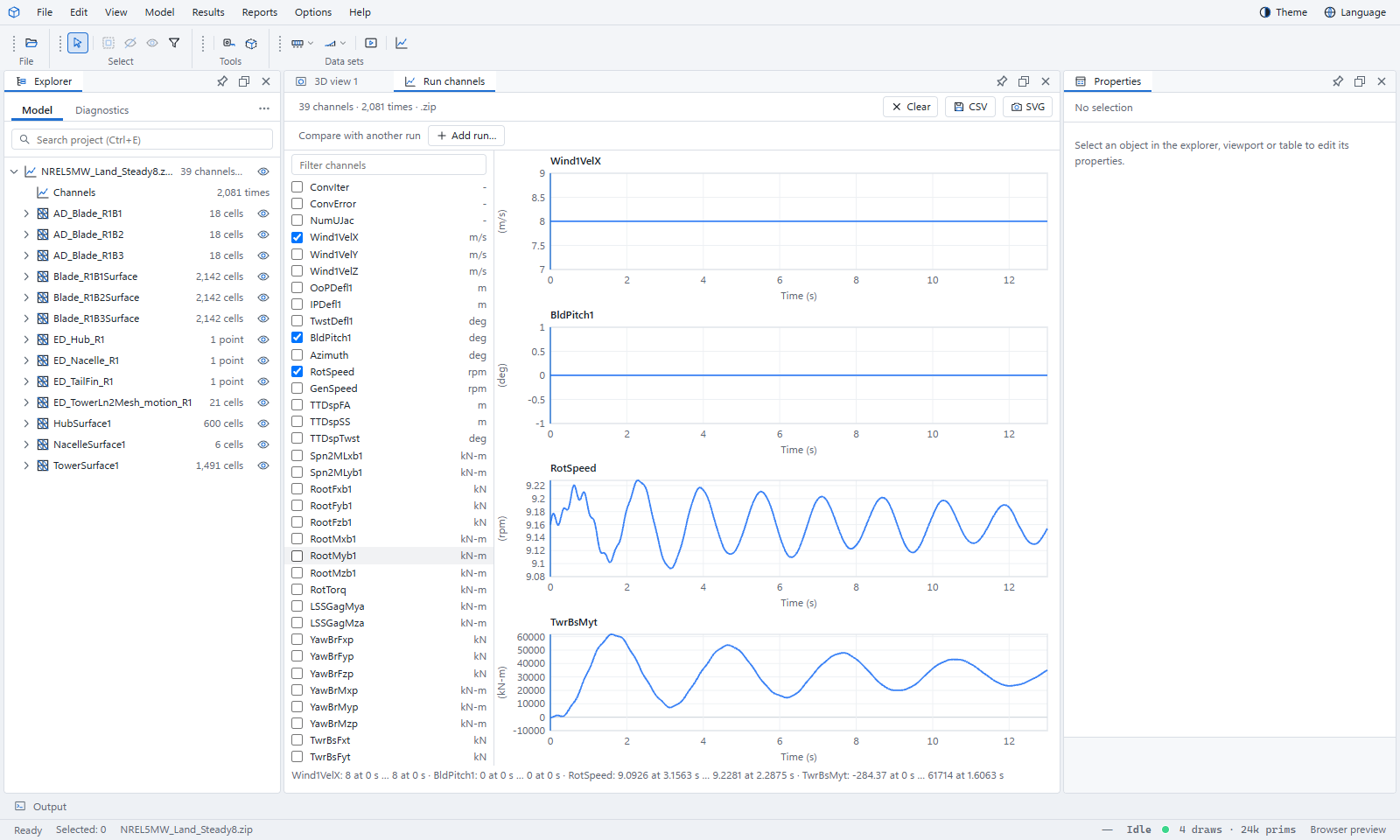
When OpenFAST finishes, a window charts the main channels: platform translations and rotations, rotor speed and blade pitch, generator power, fairlead tensions, tower base moments and wave elevation. The Output panel gives the run folder.
Save the OpenFAST deck
To run OpenFAST yourself, save the input files instead.
- Click Offshore › Renewables › Floating body as an OpenFAST deck (NREL 5 MW)….
- Enter the same values as above and click Save….
The Output panel names the folder and the command line: OpenFAST.exe <name>.fst.
Both commands need a rotor and a floating body. Fixed-bottom structures are not written as OpenFAST decks by these commands.
Compare: RAOs of the IEA 15 MW VolturnUS-S
The second floating turbine sample uses the thrust-curve rotor, so the rotor's aerodynamic damping also enters the frequency-domain RAOs.
- Click File › Samples › IEA 15 MW VolturnUS-S.
- Select the RAO study in Explorer › Studies and press F5 (or Offshore design › RAO).
- Open the Chart and choose RAOs.
The RAO study solves the body motions in the frequency domain from the BEM added mass, damping and excitation, the hydrostatics, and the mooring stiffness about the still-water equilibrium. Its hull data (builtin:volturnus.h5) were computed with Capytaine from simple shapes, so they approximate the reference hull and are meant for demonstration, not design.
What you learned
- Three rotor models: thrust curve, two-way OpenFAST AeroDyn, and a one-way thrust history.
- Chart › Offshore and Chart › Rotor show the platform, the moorings and the rotor over time.
- Mooring check checks line tensions to API RP 2SK or DNV-OS-E301.
- A floating model with a rotor can be run in OpenFAST v5 or saved as a deck.