Set the seismic hazard
Select Time history X in the Explorer. In its Seismic hazard group, choose the Code: ASCE 7, or KDS 41 17 00 : 2022. For ASCE 7, enter SDS, SD1, TL and the Site class.
The record tools use this spectrum as their target. For a KDS hazard, see the KDS report tutorial.
Get the ground motion records
The sample’s time histories generate their records before the first run. To use your own, open Assign › Ground Motion:
| Command | What it does |
|---|---|
| Import ground motion… | One acceleration record: PEER NGA .AT2, or text in columns. |
| Import ground motion pair… | Two horizontal components (two .AT2 files): the first along the study direction, the second across it. |
| Import record suite folder… | Every .AT2 file of a folder, grouped into pairs by PEER record number. Vertical files are found by name. |
| Generate ground motion… | Artificial records that match the design spectrum: one horizontal, a pair, or a pair and vertical. |
| Remove ground motion | Removes the shown record from the study. |
Text records can be in g, m/s², cm/s² or mm/s².
An artificial record is not a real earthquake. Use it to try the tools, and use real records for design decisions.
The Assign menu belongs to the modelling stage. If results have locked the model, Results › Unlock model unlocks it, and removes the results.
Scale the record
Assign › Ground Motion › Scale ground motion… scales the shown record in one of four ways:
- by a factor,
- to a peak ground acceleration,
- to a spectral acceleration at a period,
- to the design spectrum: the smallest factor that keeps the record’s spectrum at or above 90 % of the design spectrum from 0.2 T1 to 2.0 T1.
Set up the time history study
The Frame time history (OpenSees) group holds the main settings:
| Property | What it does |
|---|---|
| Shaking direction | X or Y. |
| Record | Which of the study’s records runs. |
| Components applied | All the record has, the horizontal pair, or the first horizontal only. |
| Scale factor | Multiplies the record. |
| Damping ratio (%) | Rayleigh damping, set at two modes of the loaded frame. |
| Free vibration after the record (s) | Zeros after the record, so the residual drift can be read. |
| Collapse drift (%) | A storey drift beyond this ends the run as a collapse. Default 10 %. |
| Time between result frames (s) | 0 keeps about 20 frames, plus each new peak and an envelope frame. |
The mass comes from the downward loads of the study’s combination. Use the seismic weight: dead load plus the share of live load. The Damping and mass (OpenSees) group offers other damping models; see Damping and mass.
Run the time history
Press F5 with the study selected, or choose Analysis › Nonlinear time history. Gravity is applied first and held, then the record. Integration is Newmark average acceleration. A step that fails is retried with other algorithms and halved steps.
Read the response
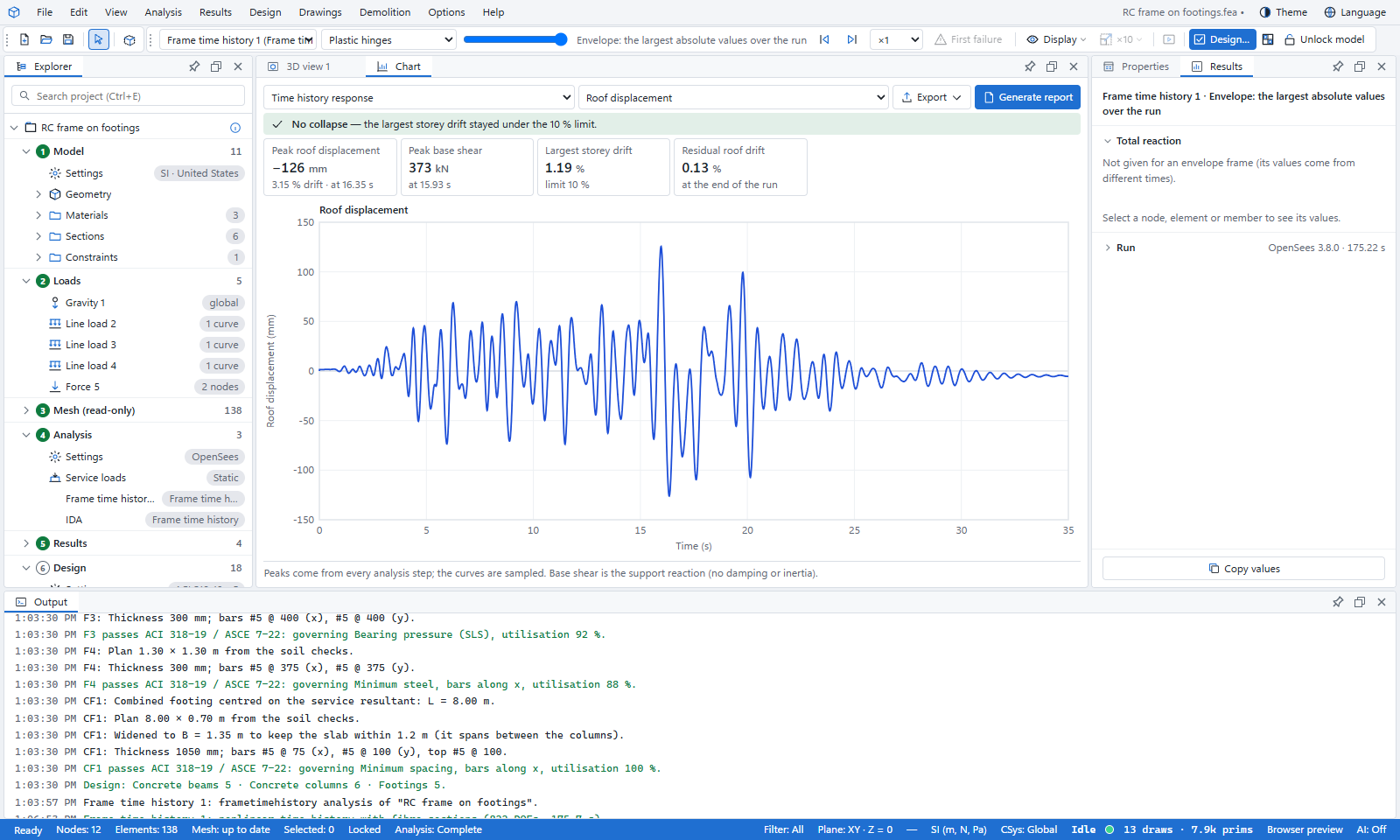
Open Results › OpenSees › Seismic charts:
- Time history response: roof displacement, drift, base shear, the shear–drift loop and the applied record, with the peaks and the residual roof drift.
- Storey drifts: peak and residual drift of each storey.
- Record spectrum: the record’s spectrum against the design spectrum, with the frame’s period marked.
- Hinge acceptance (ASCE 41) and Joint shear (ASCE 41): the largest values over the run.
- Floor response spectra and Energy balance.
Press play on the time slider to watch the building move. In Explorer › Results › Seismic results, Plastic hinges in 3D shows the hinges reaching their levels over the record.
Run a record suite
One record is not enough for design. Turn on Run as a record suite in the Record suite (ASCE 7 Chapter 16) group. The program scales the records to the target spectrum, runs every record, and checks the mean storey drift and the unacceptable responses.
- Assign › Ground Motion › Check record suite previews the scaling before you run.
- Assign › Ground Motion › Select suite records… ranks the imported records by how well their spectral shape matches the target.
- Results › Seismic › Suite element checks compares mean member shears and plastic rotations with their limits.
ASCE 7 asks for at least 11 record pairs. Several runs go at once, one OpenSees process per two logical cores.
What you learned
- Records come in from .AT2 or text files, or are generated to the design spectrum.
- The time history applies gravity, then the record, with Rayleigh damping and the mass of the seismic weight.
- Drifts, hinges, floor spectra and the energy balance are in Results › OpenSees › Seismic charts.
- A record suite scales and runs every record and checks the mean response.